
True Vertical Depth & Diameter Scaling for Professional Wellbore Diagrams
Scaling That Works Two Ways
Wellbore Genie includes two distinct scaling systems — one built for accuracy, and one built for appearance. Together they give you complete control over how your wellbore schematics look and how precisely they represent the well.
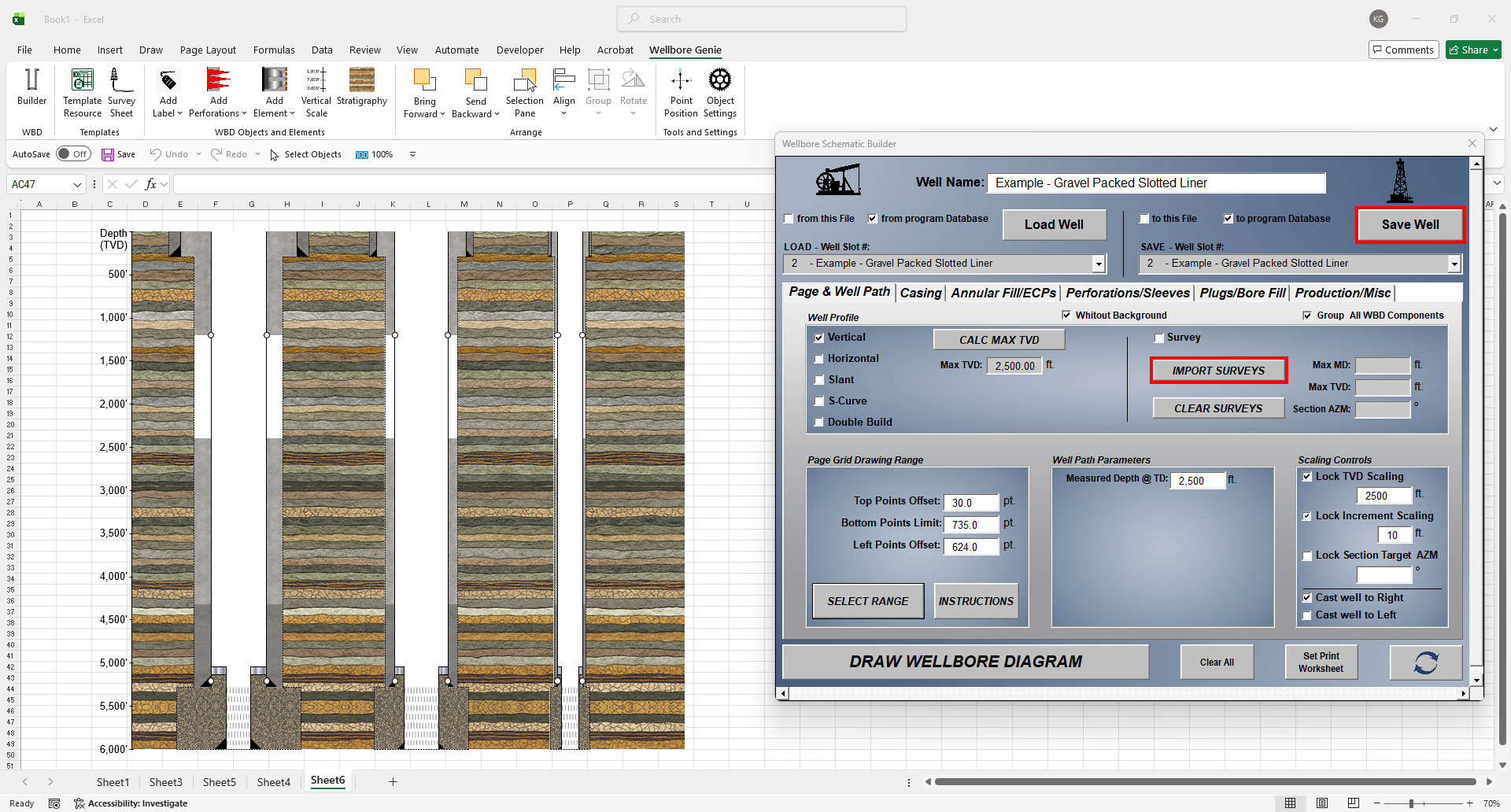
TVD Depth Scaling — Accurate to the Well
Wellbore Genie generates a vertical scale depth axis bar alongside your schematic, accurately representing True Vertical Depth. Every element on the diagram — casing shoes, perforations, plugs, formation tops — is plotted at its correct TVD position. At a glance, anyone reading the schematic can see exactly where everything is relative to depth. This is true-to-scale representation that reflects what’s actually in the ground.
Because Wellbore Genie uses consistent TVD scaling, placing multiple wells side by side on the same diagram is straightforward and accurate. This is invaluable for:
• Offset well comparisons — See how neighboring wells were completed relative to each other and to formation depths
• Sidetracks — Visualize the original wellbore and the sidetrack on the same diagram at accurate relative depths
• Pad drilling programs — Display multiple wells from the same pad with consistent depth references
Wellbore Genie’s TVD scaling is also the foundation of its stratigraphic column feature — ensuring that formation tops displayed on the schematic are plotted at their true vertical depths, not just estimated positions. This makes Wellbore Genie a powerful tool for geologists and reservoir engineers who need their well diagrams to accurately reflect subsurface geology.
Diameter & Bore Scaling — Built to Your Liking
Diameter and bore scaling in Wellbore Genie is all about how you want your schematic to look. Adjust casing strings, open hole sections, and bore sizes to suit your personal preference or your company’s visual standards. Whether you prefer a diagram that emphasizes the visual separation between strings, a more compact representation, or a specific look that matches how your team has always drawn wells — the controls are there to make it happen. This is your schematic, displayed exactly the way you want to see it.