
Stratigraphic Visualization for Wellbore Schematics — Powered by Wellbore Genie
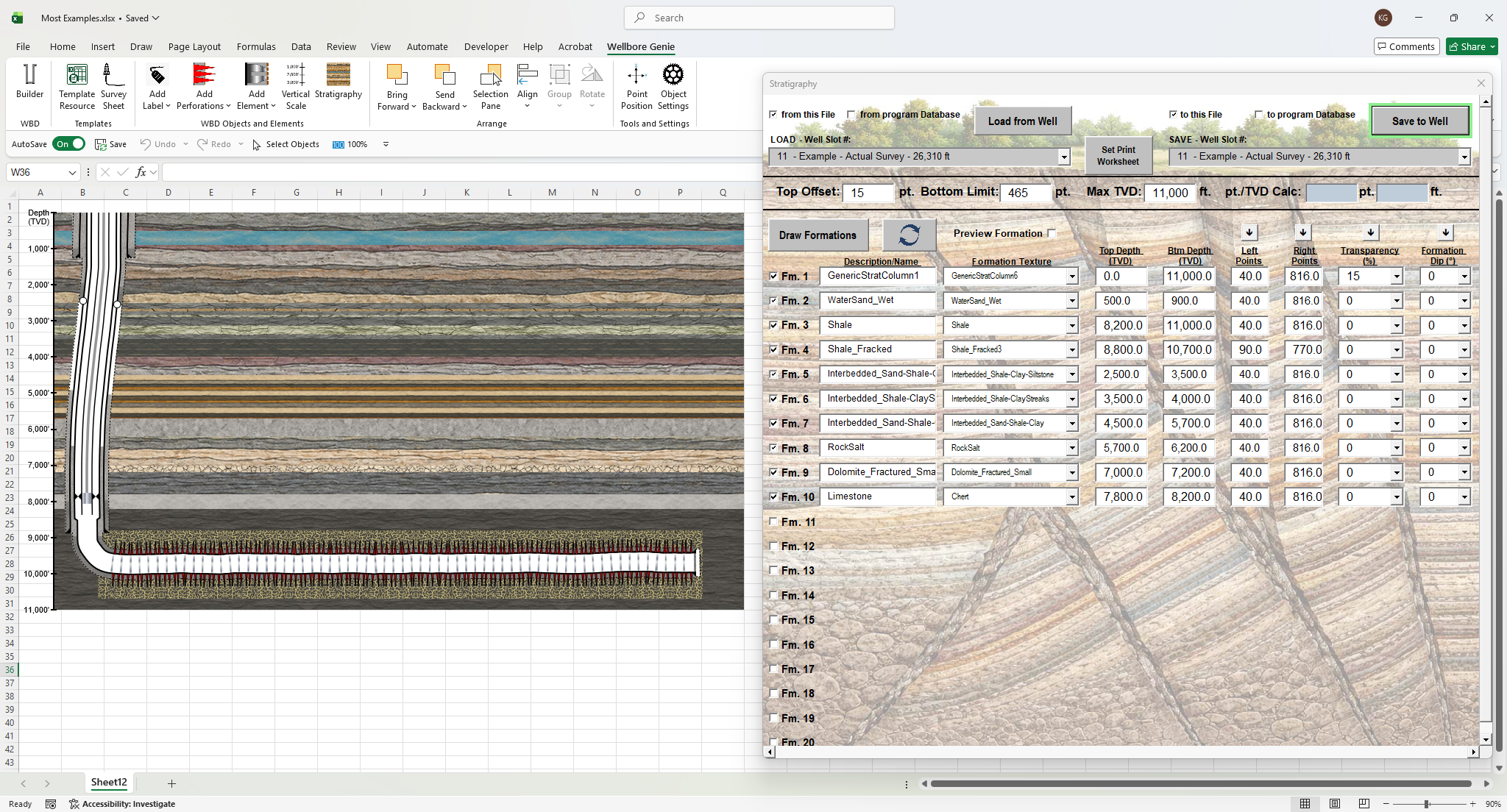
See the Earth Around the Well — Not Just the Well Itself
A wellbore schematic tells you what’s inside the hole. A wellbore schematic with stratigraphy tells you the whole story. Wellbore Genie’s built-in stratigraphic column feature is one of the most distinctive capabilities in the software — and one that sets it apart from virtually every other wellbore diagram program on the market.
For geologists and reservoir engineers, this is the feature you didn’t know a wellbore schematic program could have. For drilling, completions, and production engineers, it’s the context that makes your schematic communicate at a higher level. And for anyone involved in plug and abandonment operations, it’s an essential tool for identifying formation depths and satisfying regulatory requirements.
Over 50 Formation Textures — Built In
Wellbore Genie includes a library of more than 50 lithologic formation textures, covering the full spectrum of subsurface geology. From shales and sandstones to carbonates, mudstones, water sands, and fracked zones — the texture you need is already in the inventory. Browse the library with a live preview before you commit, so you always know exactly what you’re placing on the schematic.
TVD-Accurate Formation Placement
Every formation in Wellbore Genie’s stratigraphic column is placed at its true vertical depth, accurately scaled to match the wellbore schematic. Enter the top and bottom TVD depths for each formation and the software does the rest — placing every stratigraphic interval exactly where it belongs relative to the casing strings, perforations, and completion intervals on the same diagram.
This is the kind of precision that geologists and reservoir engineers demand. Identify and document fresh water zones, oil and gas bearing intervals, target formations, and problematic zones — all plotted at their correct TVD depths, clearly visible alongside the wellbore schematic. When your formation tops match your petrophysical data, your cross-sections, and your completion targets, the diagram becomes a genuine technical document — not just a picture of a well.
Formation Dip Visualization
For geologists working with dipping formations, Wellbore Genie includes a formation dip control that visually tilts formations to reflect their true subsurface geometry. Whether you’re working with gently dipping sedimentary sequences or steeply inclined beds, this feature brings a level of geological realism to your wellbore diagram that most engineers have never seen in a schematic program.
Transparency Controls
Wellbore Genie gives you full control over the transparency of each formation layer, letting you dial in the visual relationship between the stratigraphy and the wellbore. Prefer to see the well standing out clearly in front of the geology? Use the white background option. Want the stratigraphy to show through the wellbore for a more integrated look? Turn off the white background and let the formations show through. The choice is yours — and it takes a single click to switch.
Critical for Plug & Abandonment and Regulatory Compliance
Stratigraphy isn’t just for geologists. For production engineers, regulatory compliance teams, and anyone involved in plug and abandonment operations, accurately identifying and documenting formation depths on a wellbore schematic is often a regulatory requirement. Wellbore Genie makes it straightforward to produce a clean, professional schematic that clearly identifies formation intervals — giving regulators exactly what they need to see, presented in a format that meets professional standards.
Save and Reload Your Stratigraphic Data
Just like well data, Wellbore Genie allows you to save your stratigraphic column data to a specific well and reload it at any time. Whether you’re updating a schematic mid-well or reproducing a finalized diagram for a regulatory submission, your formation data is always ready to go.